 Back to
 Encrypted DNS and Cybersecurity: Why It Matters
 Apr 29, 2026

Every time you visit a website, your device sends a DNS query to translate the domain name into an IP address. By default, that query travels in plaintext. Anyone on the same network can read it, your ISP logs it, and attackers can manipulate it. Encrypted DNS fixes this at the protocol level.
This article covers what is exposed without encryption, how the three main protocols work, and how to deploy encrypted DNS with content filtering on your network.
What Unencrypted DNS Exposes
Traditional DNS queries are sent over UDP port 53 with no encryption. This creates three practical problems.
Interception: Anyone monitoring the network can see which domains you are querying, even if the destination site uses HTTPS. Your ISP has a full record of your browsing activity at the DNS level. On public Wi-Fi, the same is true for anyone running a packet capture.
Spoofing and cache poisoning: An attacker who can intercept your DNS queries can substitute a malicious IP address in the response, redirecting you to a phishing site that looks legitimate. Cache poisoning takes this further by injecting false records into a resolver's cache, affecting everyone using that resolver until the TTL expires.
DNS hijacking: Some ISPs intercept DNS queries and return their own responses for non-existent domains, redirecting users to advertising or search pages instead of an error. Attackers can do the same by compromising a router or DNS server.
For a deeper look at how these attacks work in practice, see our article on encrypted DNS and why it matters.
The Three Encrypted DNS Protocols
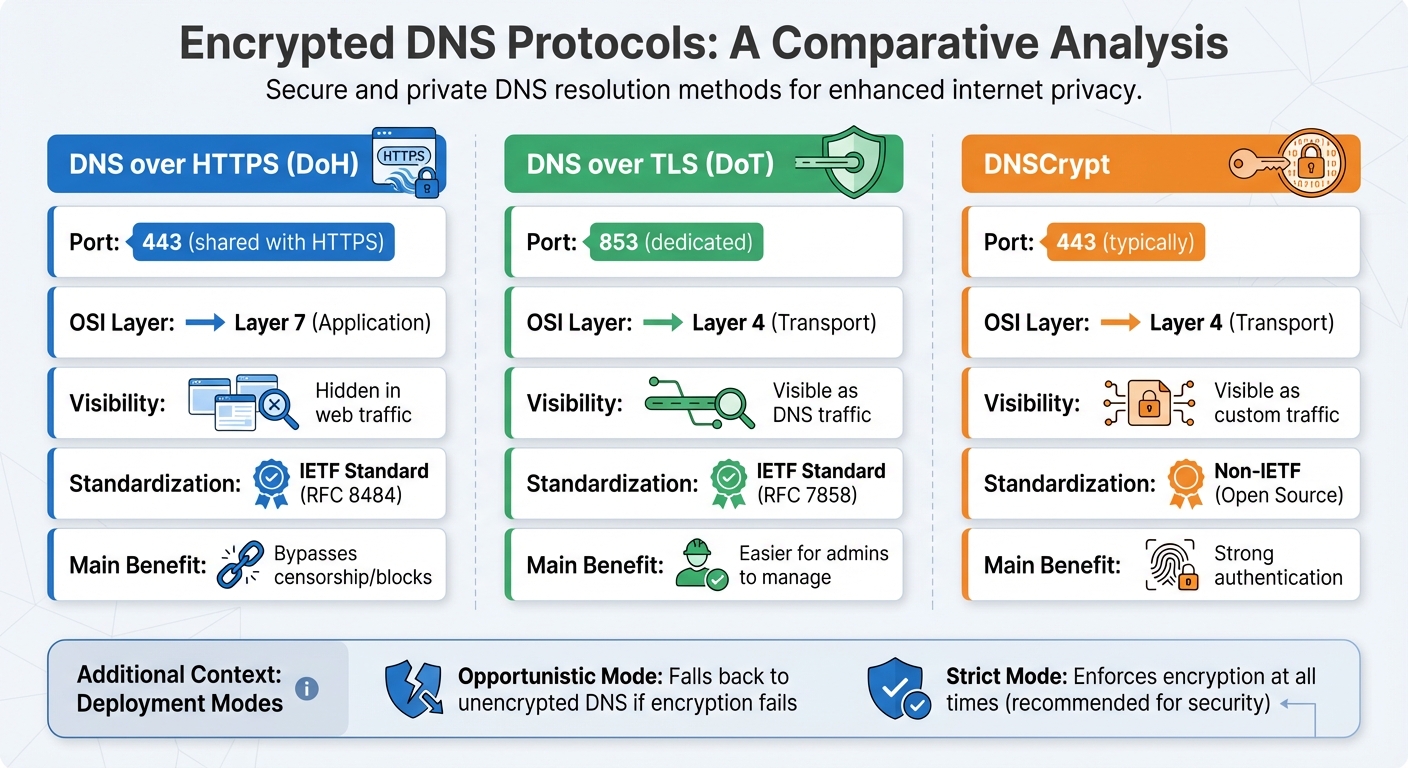
Three protocols solve the plaintext problem, each with a different approach.
DNS over HTTPS (DoH) encrypts DNS queries using HTTPS over port 443, the same port used for regular web traffic. This makes DNS queries indistinguishable from browser traffic, which gives users strong privacy but makes it harder for network administrators to monitor or control DNS at the network level. Chrome, Firefox, and most modern browsers now support DoH natively through their "Secure DNS" or "DNS over HTTPS" settings. You can read more about how this affects filtering in our guide on how to disable browser DoH.
DNS over TLS (DoT) uses TLS encryption over a dedicated port (853). Unlike DoH, DoT traffic is identifiable as DNS traffic, which makes it easier for network administrators to monitor, manage, or restrict. Android 9 and later support DoT natively through the "Private DNS" setting. On a network level, you can block unauthorized DoT by restricting outbound traffic on port 853 at the firewall.
DNSCrypt is an older protocol that uses its own cryptographic methods rather than TLS or HTTPS. It runs over variable ports and provides strong authentication to verify that responses are coming from the intended resolver. DNSCrypt predates both DoH and DoT and has broader adoption in privacy-focused communities, but it requires client software (such as dnscrypt-proxy) rather than being built into browsers or operating systems.
| Feature | DoH | DoT | DNSCrypt |
|---|---|---|---|
| Port | 443 (shared with HTTPS) | 853 (dedicated) | Variable (typically 443) |
| Visibility on network | Hidden in web traffic | Visible as DNS traffic | Visible as custom traffic |
| Standard | IETF RFC 8484 | IETF RFC 7858 | Open source (non-IETF) |
| Built into OS/browsers | Yes (Chrome, Firefox, Windows 11, iOS) | Yes (Android 9+, Linux) | No (requires client software) |
| Main benefit | Bypasses blocks, strong privacy | Easier for admins to manage | Strong authentication |
Both DoH and DoT support two deployment modes. Opportunistic mode falls back to unencrypted DNS if the encrypted connection fails. Strict mode enforces encryption at all times and will fail the query rather than fall back. For security-sensitive environments, strict mode is the right choice.
Encrypted DNS and Content Filtering
Encrypted DNS adds privacy, but it creates a complication for content filtering. When a browser uses its own DoH resolver, it bypasses the network's DNS filter entirely. Your router-level filtering still applies to plaintext DNS queries, but the browser's encrypted queries go directly to whatever resolver the browser is configured to use.
This is why browser DoH lockdown is an important part of any filtering deployment. Our Windows app and hardening guides disable browser-level DoH in Chrome, Firefox, Edge, and Brave so that all DNS traffic routes through your configured filtering resolver. See the Chrome hardening guide and how to disable browser DoH for specifics.
CleanBrowsing supports all three protocols natively. Our resolvers accept DoH, DoT, and DNSCrypt, so you can enforce encryption without giving up filtering. Our network spans 60+ points of presence globally, so encrypted queries resolve with low latency regardless of where your users are.
Setting Up Encrypted DNS with CleanBrowsing
Setup depends on your platform:
- Windows 11: Settings → Network and Internet → Wi-Fi or Ethernet → Hardware properties. Set DNS server to Manual, enable DNS over HTTPS, and enter your CleanBrowsing DoH URL (e.g.,
https://doh.cleanbrowsing.org/doh/family-filter/). - Android 9+: Settings → Network → Advanced → Private DNS. Enter your DoT hostname (e.g.,
family-filter-dns.cleanbrowsing.org). - iOS and macOS: Use the Apple DNS Configurator to generate a .mobileconfig profile. It installs system-wide DoH with one tap.
- Router-level: Point your router's DNS to CleanBrowsing's resolver IPs. If your router supports DoH or DoT, use those endpoints directly for encrypted network-wide coverage.
To verify that queries are routing through CleanBrowsing, use our DNS leak test. Results should show CleanBrowsing in the resolver list.
Free public filters (Family, Adult, Security) are available with no account required and include encrypted DNS endpoints. Paid plans start at $75 per year and add custom filter profiles, per-device policies, activity logs, and scheduling.
Filtering Guides
Practical tips and tutorials to help you get the most out of DNS filtering and safe browsing.
NOC Web Infrastructure
Secure and accelerate your websites with authoritative DNS, a global CDN, and intelligent WAF protection.
Visit NOCArticles of Interest
Contact us!
Have a question? Reach out at support@cleanbrowsing.org